
The default delivery method for all tax accounts is paper billing via Canada Post. If you opt to switch to electronic billing through the Property Tax Portal, you will receive email notifications when your tax bills are issued. Mail delivery will be discontinued and you will be able to view, download or print your property tax bills by logging into your Property Tax Portal account. All issued bills will be listed under the Account Information tab.
Property Tax Portal
View your property tax information and account balance, print tax statements and bills, change your contact information, and more.
With the self-serve property tax tool, Burlington property owners can:
- View property tax information, account balance, and payment history (from June 1, 2024 onwards)
- Sign up, change or cancel pre-authorized payment plan(s)
- Print or download a copy of your statement of account or tax bill (2025 onwards)
- Go paperless and sign up for electronic billing to receive an email notification of tax bills
- Request changes to a mailing address and/or contact information
What you should know before you sign up
- Registering for the online property tax portal is optional
- You will need your 2025 final property tax bill (or later) to sign up. The bill contains information that will be required to verify your identity
- Registering does not automatically sign you up for e-billing. You will have the option to change your delivery method within the portal
- When signing up for e-billing, you will receive an email notification when your tax bill is ready to be viewed online. A copy of your bill will not be emailed to you
- Requests to change a mailing address or pre-authorization payment plan (PAP) can take up to two business days to process. You will be notified by email when the request is completed
- Access codes are unique to each property owner; a new code will be created upon a change in property ownership
- You will only have the ability to see your tax information based on your property ownership timeframe
How to sign up for the Property Tax Portal
1. Access the City of Burlington’s Property Tax Portal
- Login in or click “Sign Up” if registering for the first time.
- Enter your email address and create a password
- Select Create New User button
2. Enter your property information as it appears on your most recent property tax bill
You will be required to enter:
-
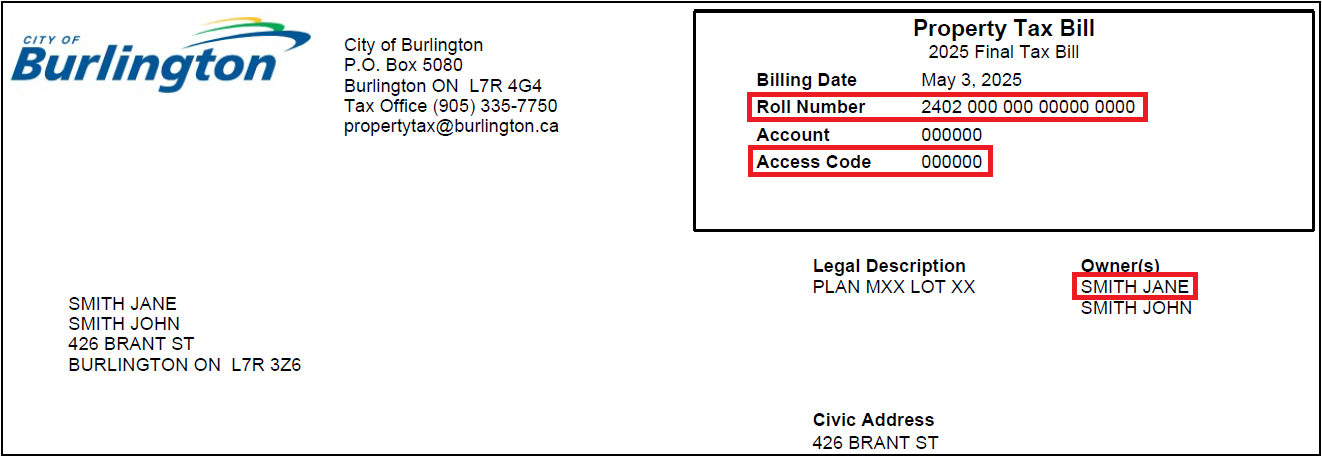
Your property roll number (found on your tax bill, as shown below – do not include spaces or dashes)
-
Your property access code (found on your tax bill, as shown below)
-
The property owner name as it appears on your tax bill (last name, first name, middle name) – all in capital letters.
-
NOTE: enter your name exactly as it appears on your tax bill. This may or may not include your middle name.
-
If multiple owners are listed on the tax bill, only one person’s name is required to set up the account.
-
How to find your name, roll number and access code on your tax bill:
3. Select Register button to complete your registration
- For more information, view the Property Tax Portal User Guide [PDF]
Property Tax Portal Frequently Asked Questions (FAQ’s)
How do I receive my tax bill if I sign up for electronic billing on the portal?
Can I add a second email to the electronic billing tax bill notifications?
Electronic billing notification emails will be sent to the email address registered when you create your account on the Property Tax Portal. If another property owner also wishes to receive email notifications for tax bills, they may create their own account on the Property Tax Portal using their email address and select the electronic billing delivery method.
Please contact the City of Burlington Tax Office.
Please contact the City of Burlington Tax Office at 905-335-7750.
If you enter incorrect credentials multiple times, you will receive an error message indicating that your account is locked. A notification email will be sent to your registered email address, informing you of the lockout and its duration. Once the lockout period has elapsed, you may attempt to log in again or reset your password.
If you receive this notification and suspect that an unauthorized individual may be attempting to access your account, please reset your password immediately to prevent any potential fraudulent activity.
Where can I find help to sign up for the property tax portal?
For help registering for the property tax portal, please:
- See the Property Tax Portal User Guide on this page.
- Call Service Burlington at 905-335-7777 or the City's Finance Department at 905-335-7750
- Visit one of the following Customer Service counters:
- City Hall (426 Brant St.) Monday to Friday, between 8:30 a.m. and 4:30 p.m.
- The Burlington Seniors Centre (2285 New St.) Monday to Friday, between 8:30 a.m. and 4:30 p.m.
- Tansley Woods Community Centre (1996 Itabashi Way) Monday to Friday, between 8:30 a.m. and 5:30 p.m., and Saturdays, between 9 a.m. and 4 p.m.
Collection of personal information
Personal information, as defined by Section 2 of the Municipal Freedom of Information and Protection of Privacy Act (MFIPPA), is collected under the authority of the Municipal Act, 2001, and in accordance with the provisions of MFIPPA.
For questions regarding the collection, use, or disclosure of this personal information please contact the City's Access and Privacy by phone at 905-335-7777, ext. 7701, toll free at 1-877-213-3609, or by email form.
For questions regarding property taxes please contact us by phone at 905-335-7750 or by email.